
Software version 5 beta
We have reached our limits in version 4. The software is now a bit dated and this limits what we can do with it and what we can add to it. To overcome this issue, we’ve worked hard to replace its very foundations with something more modern and more flexible.
We have rewritten the software in it’s entirety using newer frameworks, resulting in a more maintainable base. This ensures that we can develop the software further and that it is more future proof.
The goal was to merely recreate the version 4 software and redesign the setup, but we managed to slip a few improvements in along the way. We put effort into testing that the features of software version 5 would work the same as they did in version 4. But as is often the case in life, there is no single way to achieve the same thing, especially in CNC. Every person sets up their machine a little bit differently, every person prepares their machine before starting a job differently, which makes this process especially hard.
Important changes
A change that we already made in version 4.04.xx is of course also part of this new version 5. The changes to the use of CNC.INI. It’s now split up in a number of separate INI files.
INI is now (since 4.04.xxx) split up in:
-
- server.ini → Static machine settings
- service.ini → Service related contents
- Tools.ini → Tools related contents
- Variables.ini → Dynamic variable contents
A conversion tool for CNC.INI is of course included.
It is important to understand is that the folder structure has been changed, some of the important folders are:
- Executables are now in ‘Bin’ folder
- INI-files and macro.cnc files are in ‘Config’ folder
Have a look at folder structure after installation to see what has changed.
Another important change is that we have NOT included 3D printing as selectable option. We have not seen much interest in 3D printing and have for now removed that option.
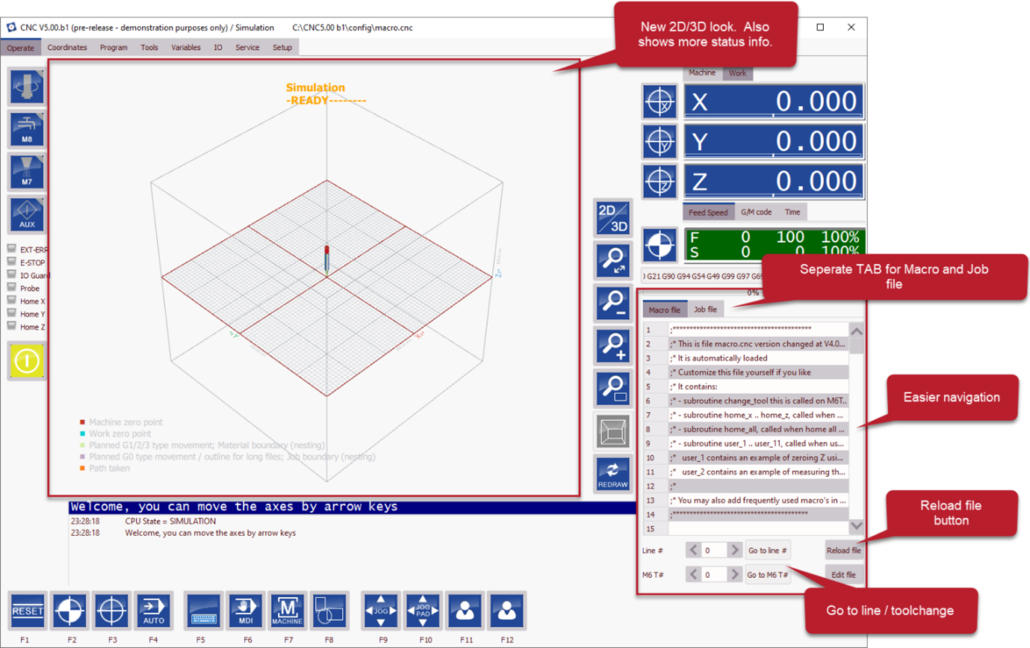
Improved/new look
Alongside the changes to the fundamentals of the software we have also made some slight changes to the UI.
Some of the most noticeable changes include:
- Easier navigation
- New 2D/3D look
- Seperate TAB for Macro and job file
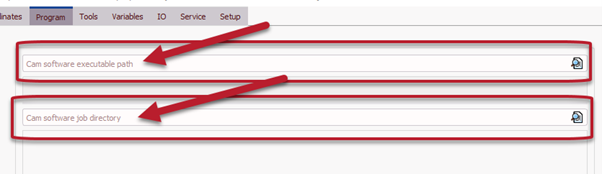
Program screen
The Program screen effectively has been removed due to a lack of support and documentation. However, you can use this to select your CAM software and the folder where its output is stored for ease of access.
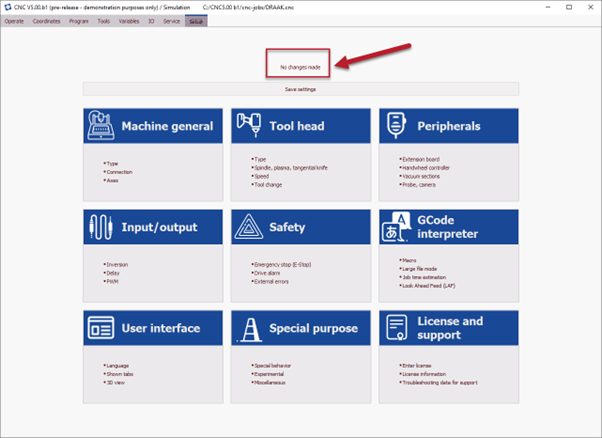
Setup screen
A very important part of the software is the new setup.In version 5 it has tiles, in this way we hope to be able to extend the setup in case of the addition of new features in the future.
Some of the improvements include:
- Help descriptions for certain settings (link)
- Categories
- License settings view is renewed
ZIP file creation
In the new version of our software there is the option to create a support archive file. By pressing this button, the software creates a ZIP file on your desktop.
The ZIP file includes:
- ini files
- macro.cnc and user_macro.cnc files
- System logs from software
- User interaction log with software
- Basic computer information
In the case of anny issues you can then send this ZIP file to the customer support so they can better resolve your software issues.
Recording user interactions
Another new feature we have added to software version 5 beta is the recording of user interactions with the software. That way we hope it is easier our support department to find issues if you can’t exactly remember what you have done. The user iteractions will be saved on a .TSV file and will be included in the earlier mentioned ZIP file.
Dark theme
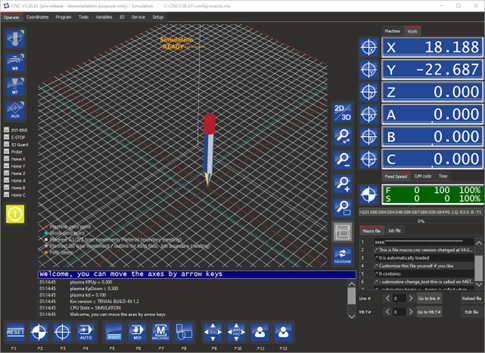
One of the many new features included in version 5 of our software is the option to change the UI to a dark theme. This might improve readability for some users.
Upgrade process
When software version 5 is released, a dialog will appear in which you will then be asked to select some initial settings. You can also choose to import previous configurations. Click here for a video explaining how to upgrade your software to version 5.
Future updates
In this blogpost we have provided you with a brief overview of what the Eding CNC team has been working on for the past two years. It is a great accomplishment of which we are all very proud. This blogpost has given you an impression on what the Eding CNC team has been working on for the past 2 years. We are looking forward to your feedback on this Beta release.
If you want to stay updated on future updates about Eding CNC you can subscribe to our newsletter here.


